User Access Key 토큰
NHN Cloud > Public API 사용 가이드 > API 인증 방식 > User Access Key 토큰
User Access Key 토큰은 User Access Key를 기반으로 발급되는 Bearer 타입의 일시적 액세스 토큰입니다. Bearer 토큰은 토큰을 소유한 사용자라면 누구나 접근 권한을 부여 받는 보안 토큰의 한 종류로, 유효 기간을 설정할 수 있어 리소스를 안전하게 보호할 수 있습니다. User Access Key 토큰은 역할 기반 접근 제어 방식(ABAC, attribute-Based Access Control)으로 동작하여 토큰을 사용할 경우 NHN Cloud 계정 또는 IAM 계정에 부여된 역할 및 권한이 적용됩니다. 따라서 호출 가능한 API가 해당 계정의 역할 및 권한 범위 내로 제한됩니다. 또한 역할 상세 조건을 설정하여 정밀한 접근 제어가 가능합니다.
User Access Key 토큰 발급 및 Public API 호출 개요
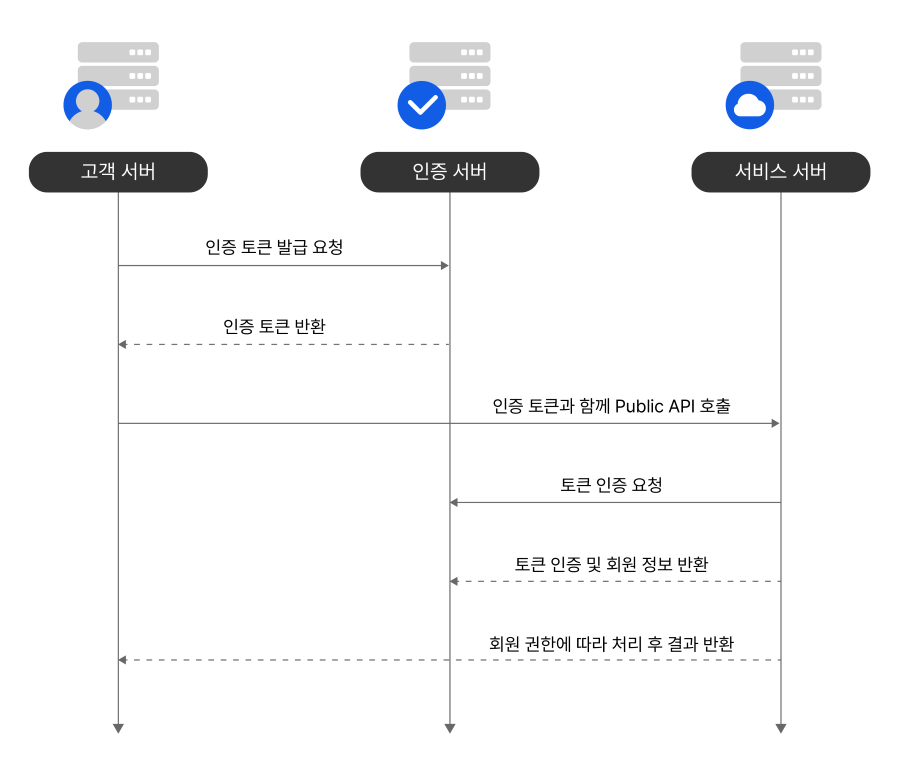
User Access Key 토큰 발급 및 API 호출은 다음과 같은 흐름으로 동작합니다.
신규 토큰 발급 및 API 호출
토큰 만료 시 재발급 및 API 호출
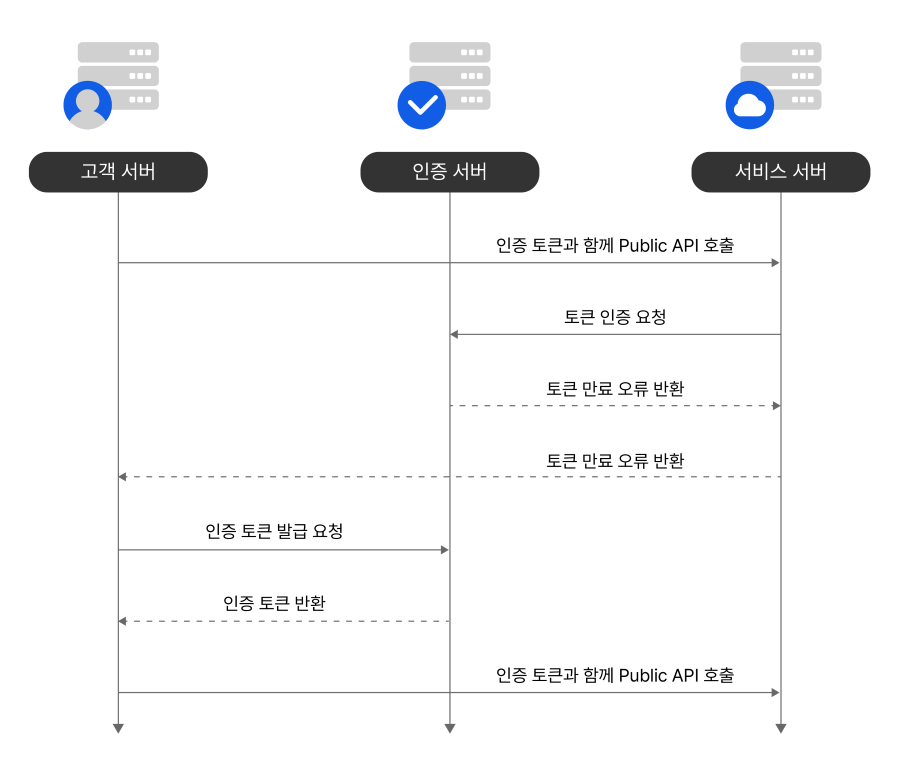
발급한 토큰은 유효 기간 동안만 사용할 수 있으며(기본값: 24시간), 만료 후에는 새로 발급해야 합니다. 토큰이 유출되었거나 유출이 의심되는 경우 해당 토큰을 즉시 만료 처리하고 필요시 재발급해야 합니다.
알아두기
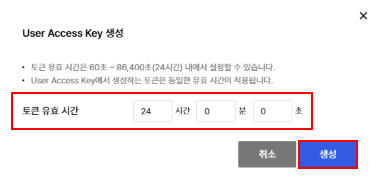
토큰의 유효 시간은 NHN Cloud 콘솔의 API 보안 설정 메뉴에서 변경할 수 있습니다. 토큰 유효 시간은 60초~86,400초(24시간) 내에서 설정할 수 있습니다. 유효 시간을 수정하기 전에 발급된 토큰의 유효 시간은 변경되지 않으며, 토큰 유효 시간 수정 후 신규로 발급하는 토큰부터 변경된 토큰 유효 시간이 적용됩니다.
사전 작업
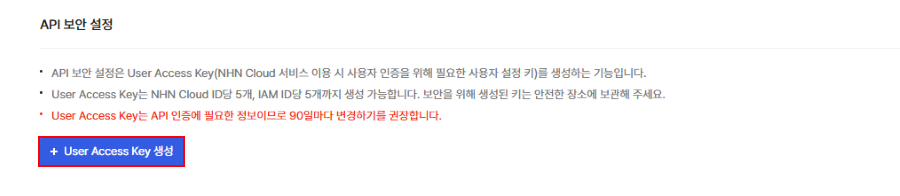
User Access Key 토큰을 발급하려면 먼저 User Access Key ID와 Secret Access Key를 먼저 발급해야 합니다. NHN Cloud 콘솔의 API 보안 설정 메뉴에서 User Access Key별 토큰 정보를 확인하고 관리할 수 있습니다.
1) NHN Cloud 콘솔에서 우측 상단의 계정에 마우스 포인터를 올리면 표시되는 드롭다운 메뉴에서 API 보안 설정을 클릭합니다.
2) + User Access Key 생성을 클릭합니다.
3) User Access Key 생성 모달 창에서 토큰 유효 시간을 설정한 뒤 생성을 클릭합니다.
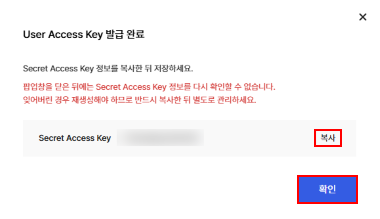
4) User Access Key 발급 완료 모달 창에서 Secret Access Key를 복사한 뒤 확인을 클릭합니다.
주의
- 모달 창을 닫은 뒤에는 Secret Access Key를 다시 확인할 수 없습니다. Secret Access Key를 잊어버릴 경우 재생성해야 하므로 반드시 복사한 뒤 별도로 관리하세요.
- User Access Key 또는 Secret Access Key 중 하나라도 유출되었거나 유출이 의심되는 경우 해당 키를 폐기하고 새로 발급 받아야 합니다.
인증 서버 도메인
인증 서버의 도메인은 다음과 같습니다.
https://oauth.api.gov-nhncloudservice.com/User Access Key 토큰 발급 요청하기
POST /oauth2/token/create
- 요청
| 구분 | 이름 | 타입 | 필수 | 값 | 설명 |
|---|---|---|---|---|---|
| Header | Content-Type | String | Yes | application/x-www-form-urlencoded | |
| Header | Authorization | String | Yes | Basic Base64(UserAccessKeyID:SecretAccessKey) | UserAccessKeyID:SecretAccessKey 를 Base64 인코딩한 결과를 Basic 뒤에 붙여서 사용 |
| Request Body | grant_type | String | Yes | client_credentials |
|
- 응답
| 이름 | 타입 | 필수 | 설명 |
|---|---|---|---|
| grant_type | String | Yes | client_credentials |
| access_token | String | Yes | 발급된 Bearer 타입의 인증 토큰 |
| token_type | String | Yes | 토큰의 타입 |
| expires_in | String | Yes | 만료까지 남은 초 단위 시간을 의미하며 기본은 86,400초(하루)임 |
{
    "access_token":"luzocEoQ3tyMvM6pLtoSTHSphgJSGhl5hVvgSstdVQ1X1bZnf9AEMGAcSERIi1Dq0bybSMv0raOcahZjYpZ2biaaoF3jTi9caF5M2TN9F98iZawbBJmN94CPF2Rpe0JI",
    "token_type":"Bearer",
    "expires_in":86400
}
케이스별 요청 예시
curl: Header에 인증 정보를 포함하는 경우
참고
아래 Authorization에 있는 dXNlckFjY2Vzc0tleTp1c2VyU2VjcmV0S2V5는 UserAccessKeyID:SecretAccessKey를 base64 인코딩한 결과입니다.
curl --request POST 'https://oauth.api.gov-nhncloudservice.com/oauth2/token/create' \
  -H 'Content-Type: application/x-www-form-urlencoded' \
  -H 'Authorization: Basic dXNlckFjY2Vzc0tleTp1c2VyU2VjcmV0S2V5' \
  -d 'grant_type=client_credentials'
curl: -u 옵션을 사용하는 경우
curl --request POST 'https://oauth.api.gov-nhncloudservice.com/oauth2/token/create' \
  -H 'Content-Type: application/x-www-form-urlencoded' \
  -u 'UserAccessKeyID:SecretAccessKey' \
  -d 'grant_type=client_credentials'
FeignClient
@FeignClient(name = "auth", url = "https://oauth.api.gov-nhncloudservice.com")
public interface AuthClient {
    @PostMapping(value = "/oauth2/token/create", consumes = MediaType.APPLICATION_FORM_URLENCODED_VALUE)
    TokenResponse createToken(@RequestHeader("Authorization") String authorization, @RequestParam("grant_type") String grantType);
}
RestTemplate
@Autowired
private RestTemplate restTemplate;

public TokenResponse createToken(String userAccessKeyID, String secretAccessKey) {
    HttpHeaders headers = new HttpHeaders();
    headers.setContentType(MediaType.APPLICATION_FORM_URLENCODED);
    headers.setBasicAuth(userAccessKeyID, secretAccessKey);

    MultiValueMap<String, String> map = new LinkedMultiValueMap<>();
    map.add("grant_type", "client_credentials");

    HttpEntity<MultiValueMap<String, String>> request = new HttpEntity<>(map, headers);

    return restTemplate.postForObject("https://oauth.api.gov-nhncloudservice.com/oauth2/token/create", request, TokenResponse.class);
}
Spring Cloud의 OpenFeign을 사용하여 자동으로 토큰을 발급 및 갱신하는 경우
참고
- 이 방법은 Spring Boot 3.0 이상 버전을 사용하는 경우에만 가능합니다.
- API를 이용해 강제로 만료시킨 경우를 대비하려면 토큰을 다시 발급하는 부분을 직접 구현해야 합니다.
1) 의존성 추가
dependencies {
  implementation 'org.springframework.boot:spring-boot-starter-oauth2-client'
  implementation 'org.springframework.cloud:spring-cloud-starter-openfeign'
}
2) Feign 클라이언트 정의
@FeignClient(name = "publicApiClient", url = "https://core.api.nhncloudservice.com")
public interface ExampleApiClient {
  @GetMapping("/v1/organizations")
  String getOrganizations();
}
3) 보안 설정 아래는 예시이며, 실제 사용하시는 보안 설정에 맞게 변경해야 합니다.
@Configuration
@EnableWebSecurity
public class SecurityConfig {
  @Bean
  public SecurityFilterChain authorizationServerSecurityFilterChain(HttpSecurity http) throws Exception {
    http.authorizeHttpRequests(authorize -> authorize.anyRequest().permitAll())
        .formLogin(AbstractHttpConfigurer::disable);
    return http.build();
  }
}
4) oauth2 클라이언트 및 feign 설정
@Configuration
public class Oauth2Config {

    @Bean
    public ClientRegistrationRepository clientRegistrationRepository() {
        ClientRegistration clientRegistration = ClientRegistration.withRegistrationId("TokenClient")
                                                                  .clientId("UserAccessKeyID")
                                                                  .clientSecret("SecretAccessKey")
                                                                  .authorizationGrantType(AuthorizationGrantType.CLIENT_CREDENTIALS)
                                                                  .tokenUri("https://oauth.api.gov-nhncloudservice.com/oauth2/token/create")
                                                                  .build();

        return new InMemoryClientRegistrationRepository(clientRegistration);
    }

    @Bean
    public OAuth2AuthorizedClientManager authorizedClientManager(ClientRegistrationRepository clientRegistrationRepository) {
        OAuth2AuthorizedClientService authorizedClientService = new InMemoryOAuth2AuthorizedClientService(clientRegistrationRepository);
        return new AuthorizedClientServiceOAuth2AuthorizedClientManager(clientRegistrationRepository, authorizedClientService);
    }

    /**
     * Feign 요청 시 자동으로 발급된 토큰을 자동으로 요청 헤더에 담아서 보내기 위한 인터셉터
     */
    @Bean
    public RequestInterceptor oAuth2AccessTokenInterceptor(OAuth2AuthorizedClientManager authorizedClientManager) {
        // Public API 요청 시 발급된 토큰을 x-nhn-authorization 헤더에 담아서 요청해야 합니다.
        return new OAuth2AccessTokenInterceptor("Bearer", "x-nhn-authorization", "TokenClient", authorizedClientManager);
    }
}
User Access Key 토큰 만료 요청하기
POST /oauth2/token/revoke
- 요청
| 구분 | 이름 | 타입 | 필수 | 값 | 설명 |
|---|---|---|---|---|---|
| Header | Content-Type | String | Yes | application/x-www-form-urlencoded | |
| Header | Authorization | String | Yes | Basic Base64(UserAccessKeyID:SecretAccessKey) | UserAccessKeyID:SecretAccessKey를 Base64 인코딩한 결과를 Basic 뒤에 붙여서 사용 |
| Request Body | token | String | Yes | access token |
|
- 응답
- HttpStatus 200
케이스별 요청 예시
curl: Header에 인증 정보를 포함하는 경우
curl --request POST 'https://oauth.api.gov-nhncloudservice.com/oauth2/token/revoke' \
  -H 'Content-Type: application/x-www-form-urlencoded' \
  -H 'Authorization: Basic dXNlckFjY2Vzc0tleTp1c2VyU2VjcmV0S2V5' \
  -d 'token=luzocEoQ3tyMvM6pLtoSTHSphgJSGhl5hVvgSstdVQ1X1bZnf9AEMGAcSERIi1Dq0bybSMv0raOcahZjYpZ2biaaoF3jTi9caF5M2TN9F98iZawbBJmN94CPF2Rpe0JI'
curl: -u 옵션을 사용하는 경우
curl --request POST 'https://oauth.api.gov-nhncloudservice.com/oauth2/token/revoke' \
  -H 'Content-Type: application/x-www-form-urlencoded' \
  -u 'UserAccessKeyID:SecretAccessKey' \
  -d 'token=luzocEoQ3tyMvM6pLtoSTHSphgJSGhl5hVvgSstdVQ1X1bZnf9AEMGAcSERIi1Dq0bybSMv0raOcahZjYpZ2biaaoF3jTi9caF5M2TN9F98iZawbBJmN94CPF2Rpe0JI'
FeignClient
@FeignClient(name = "auth", url = "https://oauth.api.gov-nhncloudservice.com")
public interface AuthClient {
    @PostMapping(value = "/oauth2/token/revoke", consumes = MediaType.APPLICATION_FORM_URLENCODED_VALUE)
    void revokeToken(@RequestHeader("Authorization") String authorization, @RequestParam("token") String token);
}
RestTemplate
@Autowired
private RestTemplate restTemplate;

public void revokeToken(String userAccessKeyID, String secretAccessKey, String token) {
    HttpHeaders headers = new HttpHeaders();
    headers.setContentType(MediaType.APPLICATION_FORM_URLENCODED);
    headers.setBasicAuth(userAccessKeyID, secretAccessKey);

    MultiValueMap<String, String> map = new LinkedMultiValueMap<>();
    map.add("token", token);

    HttpEntity<MultiValueMap<String, String>> request = new HttpEntity<>(map, headers);

    restTemplate.postForObject("https://oauth.api.gov-nhncloudservice.com/oauth2/token/revoke", request, Void.class);
}
User Access Key 토큰 사용하기
User Access Key 토큰은 HTTP 요청 헤더에 포함해 전달합니다. API 호출 시 아래 예시와 같이 요청 헤더에 User Access Key 토큰을 설정해 호출하세요.
- HTTP 헤더 형식 예시
X-NHN-Authorization: Bearer {Access Token}
사용자가 HTTP 헤더에 키를 담아 서버에 요청을 보내면 서버가 토큰의 유효성을 확인한 뒤 요청을 승인하거나 거부합니다.
알아두기
User Access Key 토큰은 오류 발생 시 The OAuth 2.0 Authorization Framework와 동일한 오류 코드를 반환합니다. 토큰 요청 API 호출, 토큰 만료 요청 API 호출, 토큰 사용 등의 상황에 반환될 수 있는 오류 코드는 프레임워크 API 가이드에서 확인할 수 있습니다.
User Access Key로 IaaS 토큰 발급받기
POST /iaas-tokens/v3/auth/tokens
User Access Key로 기본 인프라 서비스(IaaS)의 인증 토큰을 발급받을 수 있습니다. 발급받은 IaaS 토큰으로 Compute, Block Storage, Network 등 인프라 리소스 제어 API를 호출합니다.
기본 인프라 서비스의 Identity API를 직접 호출하는 방식과 달리 API 비밀번호를 설정하거나 테넌트 ID를 확인하지 않아도 됩니다. 요청과 응답은 OpenStack Keystone v3 규격을 따르므로 OpenStack CLI와 SDK에서도 사용할 수 있습니다. IaaS 토큰의 사용 방법과 서비스별 엔드포인트는 IaaS 토큰에서 확인할 수 있습니다.
알아두기
- 이 API로 발급한 IaaS 토큰의 유효 시간은 12시간으로 고정되어 있으며 변경할 수 없습니다.
- 별도의 인증 헤더가 필요하지 않습니다. User Access Key ID와 Secret Access Key를 요청 본문에 담아 전달합니다.
사전 조건
- 토큰을 발급받을 프로젝트에 Instance 또는 Object Storage 서비스가 활성화되어 있어야 합니다.
- User Access Key를 생성한 계정이 해당 프로젝트 권한을 가지고 있어야 합니다.
요청
| 구분 | 이름 | 타입 | 필수 | 값 | 설명 |
|---|---|---|---|---|---|
| Header | Content-Type | String | Yes | application/json | |
| Request Body | auth.identity.methods | Array | Yes | ["password"] | 인증 방식 목록. password만 지원합니다 |
| Request Body | auth.identity.password.user.id | String | Yes | User Access Key ID | |
| Request Body | auth.identity.password.user.password | String | Yes | Secret Access Key | |
| Request Body | auth.scope.project.id | String | Yes | 토큰을 발급받을 서비스의 Appkey. Instance 또는 Object Storage의 Appkey를 사용하며, 이 Appkey로 대상 프로젝트를 식별합니다. Appkey 확인 방법은 Appkey를 참고하세요 |
응답
발급된 IaaS 토큰은 응답 본문이 아닌 X-Subject-Token 헤더에 담겨 반환됩니다.
| 구분 | 이름 | 타입 | 설명 |
|---|---|---|---|
| Header | X-Subject-Token | String | 발급된 IaaS 토큰 |
| Body | token.issued_at | String | 토큰 발급 시각 |
| Body | token.expires_at | String | 토큰 만료 시각. 발급 시각으로부터 12시간 뒤입니다 |
| Body | token.project | Object | 토큰이 적용되는 프로젝트 정보 |
| Body | token.user | Object | 토큰을 발급받은 사용자 정보 |
| Body | token.roles | Array | 해당 프로젝트에서 사용자에게 부여된 역할 목록 |
| Body | token.catalog | Array | 사용할 수 있는 서비스 엔드포인트 목록 |
요청 예시
- curl
curl -X POST "https://oauth.api.gov-nhncloudservice.com/iaas-tokens/v3/auth/tokens" \
  -H "Content-Type: application/json" \
  -d '{
        "auth": {
          "identity": {
            "methods": ["password"],
            "password": {
              "user": {
                "id": "flyKphnHuI6sDRglmma6",
                "password": "yjZRN9uX71IHAiFS"
              }
            }
          },
          "scope": {
            "project": {
              "id": "r9Zd7vDEmWMfQb00"
            }
          }
        }
      }'
응답 예시
- 응답 헤더
HTTP/1.1 201 Created
Content-Type: application/json
X-Subject-Token: gAAAAABnDqW1x3TQZ8kP2mN7vL4hR9sE6yU1aI0oF5cB3dG7jK2nM8pQ4rS6tV9wX1zY- 응답 본문
예시
{
  "token": {
    "methods": [
      "password"
    ],
    "issued_at": "2026-10-13T02:35:05.000000Z",
    "expires_at": "2026-10-13T14:35:05.000000Z",
    "project": {
      "id": "f5073eaa26b64cffbee89411df94ce01",
      "name": "example-project",
      "domain": {
        "id": "default",
        "name": "Default"
      }
    },
    "user": {
      "id": "a1b2c3d4e5f6478899aabbccddeeff00",
      "name": "example-user",
      "domain": {
        "id": "default",
        "name": "Default"
      }
    },
    "roles": [
      {
        "id": "21b7753ad7b54f1284af6e292cb35bea",
        "name": "project_reader"
      }
    ],
    "catalog": [
      {
        "type": "compute",
        "name": "nova",
        "endpoints": [
          {
            "region": "KR1",
            "interface": "public",
            "url": "https://kr1-api-instance-infrastructure.gov-nhncloudservice.com/v2/f5073eaa26b64cffbee89411df94ce01"
          }
        ]
      }
    ]
  }
}
오류 응답
오류가 발생하면 OpenStack Keystone 규격의 오류 응답을 반환합니다.
| HTTP 상태 코드 | 설명 |
|---|---|
| 400 Bad Request | 요청 형식이 올바르지 않은 경우 |
| 401 Unauthorized | User Access Key 또는 Secret Access Key가 유효하지 않거나, 요청한 Appkey로 토큰을 발급받을 수 없는 경우 |
| 500 Internal Server Error | 서버 내부 오류가 발생한 경우 |
{
  "error": {
    "code": 401,
    "message": "The request you have made requires authentication.",
    "title": "Unauthorized"
  }
}
주의
- User Access Key 또는 Secret Access Key가 일치하지 않거나 User Access Key가 사용 중지 상태이면 토큰이 발급되지 않습니다.
- 요청한 Appkey의 프로젝트에 해당 서비스가 활성화되어 있지 않으면 토큰이 발급되지 않습니다.
- 사용자가 프로젝트에서 권한을 잃을 경우 발급된 IaaS 토큰은 사용할 수 없습니다.